Review of the Slashdot discussion of CUPS
The following is a review of a discussion which took place on the slashdot forum. I've summarized some of the postings into what I think is useful for working with CUPS.
I've been struggling with setting up a new laptop and getting it to talk to my print server, using Fedora Core 3, and nothing seems to have changed -- the admin items for adding a printer are exactly as Eric described them back then -- unclear, confusing, and no where near as friendly as their Win* equivalents. Definitely not something I'd expect my Aunt Ethel to be able to figure out. What's going on here?
For those who are still frustrated with the CUPS GUI, how would you improve it?
By using Mac OS X's interface to CUPS. [apple.com]
The hardest part of setting up a printer using CUPS under Debian was knowing that I had to point my browser at http://localhost:631/ [localhost]. After that, what's so hard about clicking on Printers, Add Printer, then select the make and model?
Mandr{ake,iva}'s printer admin thingie actually runs nmap to sniff your network and find all printers exported by all machines using any protocols it knows how to talk. It's pretty amazing, but it took 10 minutes or more to run on the building network here, during which time the GUI didn't repaint and appeared hung.
I would have killed it in disgust, thinking it really was hung, but first I did a "top" to see if I could tell what it was doing. Then my jaw dropped when I saw it running nmap and starting and stopping many other processes to try to connect to the open ports it was finding, so I let it finish and was fairly impressed. It really needs a progress bar, or better, to have printers pop up in the GUI as they are found.
Fedora's printer config dialog sucks -> Linux printing status: unfriendly.
I'm partial to the KDEPrint system [kde.org], and wish that it was half as easy to configure network printers in Windows as it is through the nice KDE GUI.
Not long ago, there was a Slashdot review [slashdot.org] of a certain book [oreilly.com], which included a chapter on CUPS that can be downloaded for free [oreilly.com] (can't beat that price!). It seems to demystify the entire process of administering CUPS.
The reason some printers work on OS X and not on Linux is because CUPS allows running binary print filters.
Many printer manufacturers use Carbon filters for OS X. Game over.
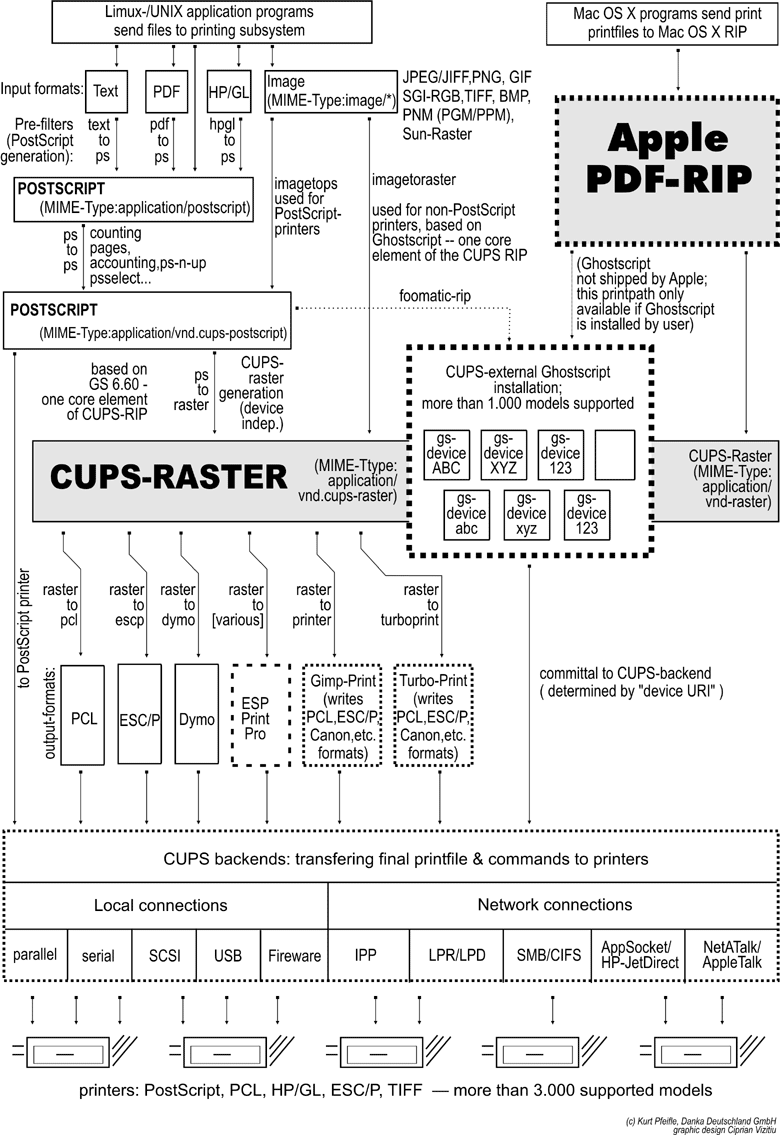
CUPS is a full featured RIP and postscript processor. It does support arbitrary binary printing, however, and this is exactly what happens when you print to cups from windows via samba. Please see the cups documentation [samba.org].
If cups is just a "dumb spooler", explain lease how the heck it can print pdf, jpeg, hp-gl, tiff, and hundreds of other formats directly to your postscript printer?
If you don't have a postscript printer, yes, you must use a ppd that calls a intermediary driver (e.g., hpijs) that cups just passes the job to.
forget the CUPS application tools, user http://localhost:631. The www interface at least works all the time.

<< Home